Beta 1 · first public beta
Ubuntu, run by AI
Navision is a desktop for Ubuntu with its own Wayland compositor in Rust. An assistant on your own Claude Code or Codex subscription writes code and runs the system. Anything the mouse can do, it can call as a command.
- base
- Ubuntu 26.04 · x86_64
- compositor
- Wayland · Rust · Smithay 0.7
- agents
- Claude Code · Codex · ACP
- remote
- macOS · QUIC · Metal
- status
- Beta 1

Install Dockersample
Install Docker and check that it works
Installing the package. It needs root:sudo apt install docker.io
Password window
Docker is installed, hello-world ran
+
~/projectsAsk first37%
This is how the compositor works: frames appear only where something changes. In between it sleeps, and the screen keeps the last frame.
frames in the last 6 seconds: 72 of 360
- 45ms
from compositor start to first frame
Median of five starts without a monitor. On a 4K monitor: 261 ms.
- 0.2per second
wakeups of the whole idle desktop
With a still wallpaper: 0 ms of CPU and 0 ms of GPU per second.
- 10.3ms
from mouse click to screen
Median on a 4K 120 Hz monitor; 95th percentile 14.2 ms.
- 73MB
memory of all desktop processes
In the same run GNOME Shell takes 176 MB and KDE Plasma 330 MB.
nova-brain · nova-agentd · nova-mcp
Claude Code in a window, not a terminal
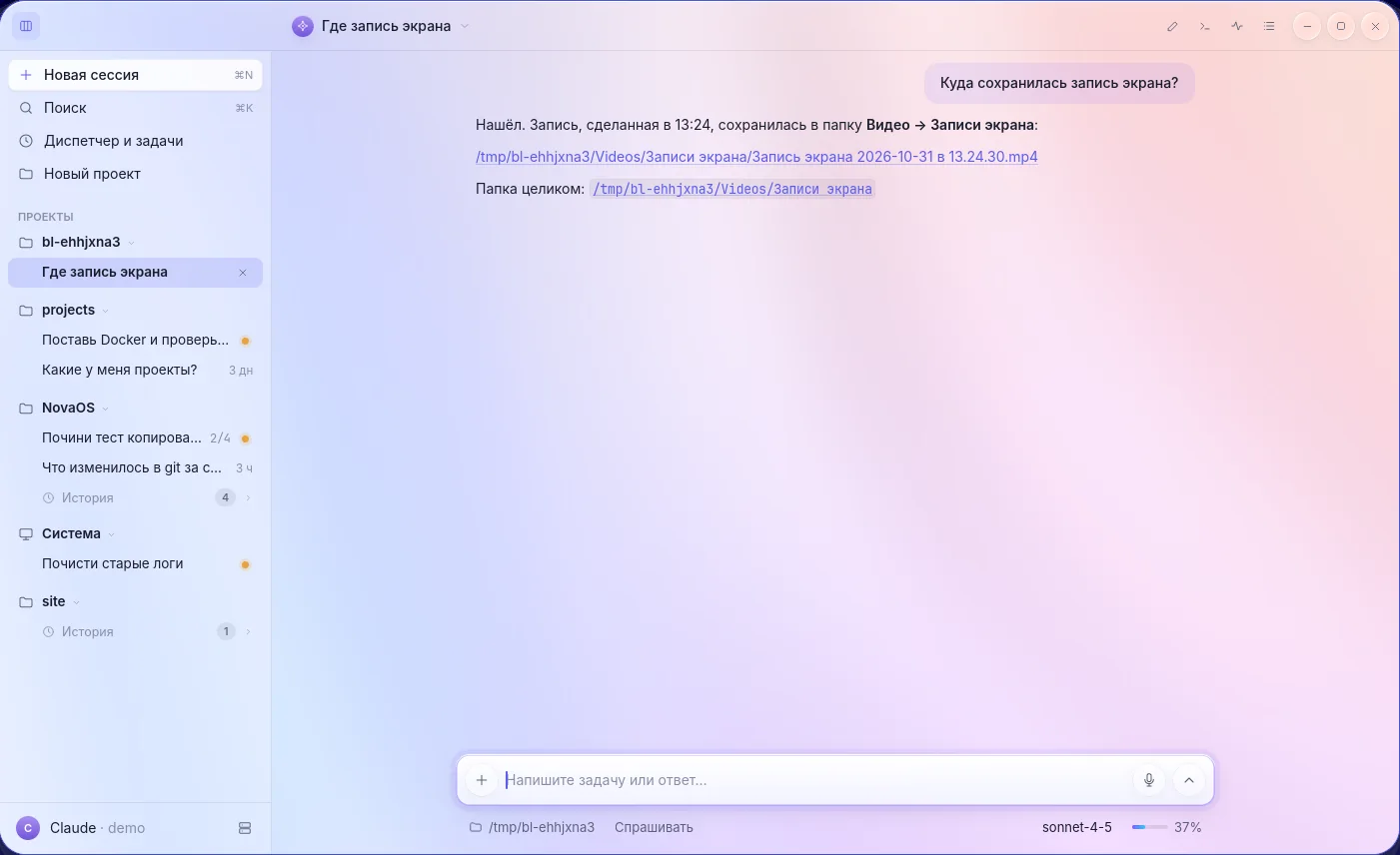
The Assistant is a chat with projects and history. Your agent's official CLI does the work, so your subscription works as it is: Navision does not touch tokens and never calls a model API itself.
Any agent, several subscriptions
Claude Code and Codex are connected directly. OpenCode, Gemini CLI and Qwen Code come through the ACP protocol. You can switch agents mid-chat.
The chat runs Ubuntu
"Install Docker", "what is loading the server", "fix the test". File links in answers open Files.
Dispatcher
A separate session on a fast model hands tasks to background agents, comes back to them, and answers by voice. It changes nothing itself.
Jobs on a schedule and on events
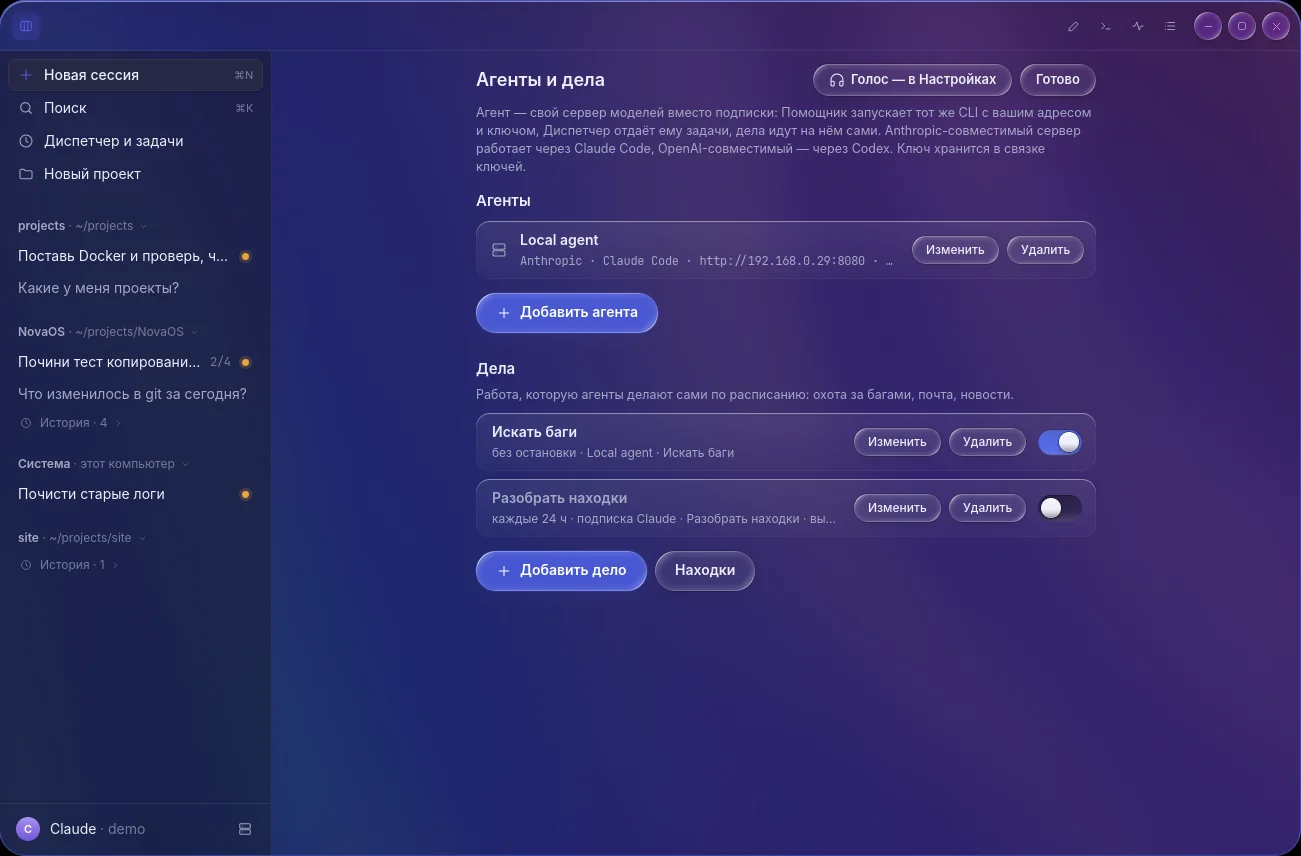
Every hour, on weekdays, non-stop, or on a CI or GitHub event. For example, an agent on your local model hunts for bugs and your subscription triages what it finds.
Work outlives the window
Agents live in the
nova-agentdbackground service. Close the window or restart the shell and they keep going.
- Claude Code
- Codex
- OpenCode
- Gemini CLI
- Local agent
The Dispatcher hands the task to agents, watches them and brings back the answer.
comp.sock · nova-ctl · MCP
Every button is a command
The compositor has a control socket and an MCP server. Whatever you do with the mouse, an agent does with the same command and the same result. Up to 16 calls run in parallel.
- windows and desks
- monitors
- launching apps
- settings
- screenshots and recording
- accessibility tree
- ui_tree
- ui_find
- ui_act
- mouse and keyboard input
- voice and music
- test browser
nova-rootd · polkit · nova-cage
An agent you can trust with the system
An agent's root command does not run until you have seen it in full and typed your password. Every command goes this way; nothing is remembered for five minutes.
- sudo apt install …The agent calls sudo inside its sandbox.
- nova-sudoInstead of sudo, a Navision client passes the command over D-Bus.
- nova-rootdThe root broker. It learns who is calling from the kernel, not from the caller.
- polkit · auth_adminpolkit asks for the admin password on every command.
- password windowThe command is shown in full; dangerous ones are flagged: rm -rf /, mkfs, dd.
No user process ever sees the password
It goes only to polkit's system helper. Neither the agent nor the Assistant window receives it.
A sandbox for every CLI
The agent runs in bubblewrap, like Flatpak apps.
.ssh,.gnupg,.aws,.kube, the keyring and browser profiles are hidden. It has no access to input devices.Doors to the outside are opened explicitly
systemd services, Dispatcher tasks and subtasks go through separate narrow doors. Anything that runs outside the sandbox (autostart,
.bashrc) is read-only for the agent.Your own model server
A local LLM by address and key: an Anthropic-compatible API works through Claude Code, an OpenAI-compatible one through Codex. The key is kept in the keyring.
nova-comp · frame_clock · nova-hold
A frame is drawn only when something changed
The compositor is one event thread with no just-in-case timers. A client, an input device or the deadline of a specific frame wakes it. The rest of the time it sleeps.
Sleep until an event
No polling and no idle loops. What is not visible is not animated.
Damage only
Only the changed area is redrawn. The still bottom of the scene is flattened into one layer.
vblank minus budget
A frame starts as late as possible. The budget is not a constant: it is measured from recent frames.
The same frame
A fast app gets its signal early and makes the current frame. A GPU buffer is applied when its fence signals.
Cursor outside frames
A separate thread moves the pointer on its own display plane without waiting for the scene.
Two refreshes of a 120 Hz monitor. The pointer makes the first, a mouse click the second. Measured on a real 4K monitor.
- 0–3.3ms/s
Late frames (hitch) across all scenarios
That is 0–2 late frames out of 600. Below 5 ms/s the eye does not notice. Before the new frame architecture, opening a window gave 323 ms/s.
- 0.74–1.83ms
GPU time per frame
Idle 0.74–0.77 ms, focus change 1.63 ms, smooth scrolling 1.83 ms.
- ≈ 0.2s
Compositor restart
The monitor does not go dark: the old process's last frame stays on screen until the new one's first.
Test machine: Ryzen 9 9900X, integrated Radeon (2 CU RDNA2), Samsung Odyssey G8 32″ 4K 120 Hz, ×1.5 scale, HDMI, 1 kHz mouse, kernel 7.0. All live figures come from one machine.
A crash loses no work
A separate process,
nova-hold, keeps the Wayland socket and brings the compositor back. Terminals live innova-keeperand return with 10,000 lines of history. Agents run in their own service.
What survives a restart
Navision's own apps and Qt 6 programs reconnect. GTK, Chrome, Electron and X11 reopen in the same places, Chrome with its tabs. Unsaved work in a GTK program is lost.
What is not there yet
VRR works only under a fullscreen window. Direct scanout of a window to a display plane is on only for windows without a Navision frame, and is not yet verified on a monitor.
scripts/benchmark · 2026-11-06 · 92aa33cd
Compared with GNOME, KDE and Sway by one command
scripts/benchmark starts every desktop without a monitor on the same GPU, at 3840×2160, with the same client programs. Everything is measured from outside, from /proc and the kernel's GPU counters: the comparison uses no internal Navision counters.
First window, ms
From compositor start to the first shown frame of a window.
Memory at idle, MB
PSS of every desktop process: compositor, shell and the services it started.
App launch, ms
From launch to the window's first frame in Navision. Its own apps and Chrome.
Cost of a 4K frame, GPU ms
Time the GPU itself spends on one full frame, by scene.
Idle wakeups per second
How many times a second the desktop wakes while you do nothing. Lower is better.
Window animation, GPU ms per second
What a program that redraws on every frame costs the desktop.
The full comparison table
| Desktop | idle: CPU, ms/s | idle: wakeups/s | idle: GPU, ms/s | animation: CPU, ms/s | animation: GPU, ms/s | client frames/s | hitch, ms/s |
|---|---|---|---|---|---|---|---|
| Navision · live wallpaper | 8.7 | 149.9 | 24.4 | 30.0 | 108.5 | 60.0 | 0.0 |
| Navision · still wallpaper | 0.0 | 0.5 | 0.0 | 21.0 | 107.3 | 60.0 | 0.0 |
| GNOME Shell 50.1 | 2.0 | 5.0 | 0.0 | 38.0 | 146.3 | 60.0 | 0.0 |
| KDE Plasma 6.6.6 | 1.0 | 7.2 | 0.0 | 18.5 | 85.9 | 60.0 | 0.0 |
| KWin 6.6.6 | 0.0 | 0.4 | 0.0 | 17.0 | 84.8 | 60.0 | 0.0 |
| Mutter 50.1 | 0.0 | 0.0 | 0.0 | 21.5 | 84.3 | 60.0 | 0.0 |
| Sway 1.11 | 0.0 | 0.0 | 0.0 | 15.0 | 98.2 | 62.3 | 0.0 |
Where Navision loses. With the live wallpaper that is on by default, an idle desktop wakes 150 times a second and keeps the GPU busy for 24 ms/s; the other desktops sleep. With a still wallpaper it is 0.5 wakeups. Animating a window costs the GPU 108 ms/s: more than KWin (85) and Sway (98), less than GNOME Shell (146). Sway and bare Mutter use less memory. The desktops draw different things (GNOME draws a panel, bare KWin only a background), so this compares cost, not looks. Weston is left out of the table: its headless mode paces frames at about 40 Hz on its own.
Measured 2026-11-06, commit 92aa33cd. AMD Ryzen 9 9900X (24 threads), 59.5 GB, integrated Radeon Granite Ridge, Mesa 26.0.8, Ubuntu 26.04.1, kernel 7.0.0-42. Headless, virtual 60 Hz vblank, medians. GNOME Shell 50.1, KWin and Plasma 6.6.6, Mutter 50.1, Weston 14.0.2, Sway 1.11.
nova-remoted · QUIC · wgpu / Metal
Remote Navision: a server with no GPU, an interface drawn by your Mac
Navision runs on any Ubuntu server, and the client draws the Dock, windows, menus and animations itself. Interface motion therefore does not depend on the network: the server sends only what changed.
The server needs no graphics card
Programs, agents and services run on the server. It renders on the CPU.
Your Mac drives the shell
The Dock with magnification, menus, opening, closing and dragging windows, and switching desks are animated by the client on its own clock, with the same code as the system itself. Metal draws it.
A scene, not video
The shell arrives as a list of shapes, and only as changes. Images are sent once. There is no video codec, so text is always sharp.
Other apps' windows as tiles
An unchanged tile is not sent, a single-colour one goes as one colour, scrolling goes as a move. zstd and LZ4 compress the rest.
One QUIC connection
UDP, TLS 1.3. Pointer motion travels as datagrams. The interface model outranks sound, and sound outranks pixels.
SSH key sign-in
No passwords. The client gets the server certificate's fingerprint over SSH; the one-time pass lives for two minutes.
Ubuntu server
No graphics card, no monitor. Programs, agents and services run here.
- Full frame of the top bar and Dock, 1920×1080≈ 2 KB
- Scrolling one line in a 640×400 window≈ 4 KB
- A 96×48 area changed≈ 1.2 KB
- Sound≈ 1.5 Mbit/s
- Pointer and keysdatagrams
Your Mac
Draws the Dock, windows, menus and animations itself, with Metal.
What we do not promise. We have not measured network latency yet, so there are no figures for it here. Programs on the server run without GPU acceleration. The client is Mac-only for now, on Apple Silicon, and is not notarized. With sound you need a link of at least 1.5 Mbit/s.
Cargo.toml · 98 crates · CI
Rust from the compositor to the apps
Its own compositor on Smithay, not a fork. One event thread, no async runtime. The window domain knows neither Wayland nor the GPU and is checked by ordinary unit tests.
- 98
crates
Each has one responsibility. A file with more than 600 lines of code fails CI.
- 518k lines
of Rust
Including tests.
- 7,236
unit tests
Every PR runs the tests of the crates it touches; main runs them all.
- 127
scenarios on a copy of the system
Each starts its own headless copy of Navision. A fast set runs on every PR, all of them every night.
Compositor
Rust 2021 · Smithay 0.7 · calloopSmithay with one patch of our own: the cursor plane updates outside the shared frame.
Rendering
GLES · llvmpipe · PixmanFallback paths render on the CPU: that is how GPU-less checks and Remote Navision run.
Text and raster
cosmic-text · swash · tiny-skiaLayout can be computed without a GPU, so tests cover it.
Control
JSON socket · MCP · D-Bus (zbus)The mouse, the command line and an agent call the same commands.
Sign-in and security
bubblewrap · polkit · PAM · greetdProven system mechanisms instead of home-made ones.
Sound and screen recording
PipeWire · VAAPI / FFmpegThe GPU encodes screen recordings.
Remote
QUIC (quinn) · TLS 1.3 · CBOR · zstd · wgpuThe same shaders, rewritten in WGSL, draw the interface on the Mac.
Terminal
foot · alacritty_terminal · nova-keeperA session lives in its own process and survives a shell restart.
Accessibility
AccessKit · AT-SPIOne tree for the Orca screen reader and for the agent.
rule 2 · resources on demand
What runs while you do nothing? Nothing
This is a review question for every change. Services start when first needed and stop when they are not.
XwaylandX11 programs. Starts with the first window in 40 ms and gives back 90 MB when it leaves. stops after 10 snova-sysdWi-Fi, Bluetooth, sound and brightness while the control centre is open. stops after 10 snova-wifidWi-Fi as root, on call. stops after 10 snova-rootdRoot broker, on an agent's first command. stops after 10 snova-portalThe system file chooser. stops after 10 snova-voxdVoice: dictation and reading aloud. on requestnova-recdScreen recording video. one process per recordingnova-authPassword check. one process per attemptnova-remotedRemote Navision server. stops after 10 min with no clientnova-soundInterface sounds. stops after 1.5 s of silence
ARCHITECTURE.md · comparison
How Navision differs from GNOME, KDE, COSMIC and niri
Only here
A control socket with MCP for agents
GNOME exposes D-Bus and extensions, niri has
niri msg. Here an agent sees the interface tree and presses what you press.Terminals and agents survive a shell crash
In GNOME on Wayland a shell restart closes your programs. COSMIC and niri do not keep the Wayland socket in a separate process.
Window logic is tested without Wayland
Stacking order, tiles and desks are plain code with unit tests; no graphics need to start.
A smooth mouse wheel in other apps
One wheel click is spread over 18 steps in 150 ms for GTK, Qt Widgets and the terminal: GTK 3 gets 9 frames instead of one. KWin, Mutter, Sway, Hyprland and niri do not do this.
Where others are stronger
COSMIC is more mature
It has more mature code, tree tiling and its own toolkit.
The bar and Dock live inside the compositor
As in GNOME: one GPU context and cheap glass. The price is that a bug in the bar takes the compositor down, which is why a restart is built to lose nothing.
Idle with a live wallpaper
KWin, Mutter and Sway do not wake at all when idle. Navision manages that only with a still wallpaper.
nova-app · nova-voxd · nova-monitor
A whole system, not a theme
Its own apps share one toolkit and open in 32–36 ms. Other programs work as usual.
Assistant
Chat with agents, projects, history, the Dispatcher and scheduled jobs.
Terminal
Tabs on ⌘T drag between windows. Links and paths are clickable. A line that is not a command goes to the agent on Enter.
Files
Quick Look for office files and PDF. It is also the system file chooser.
Editor
A code editor with syntax highlighting.
Monitoring
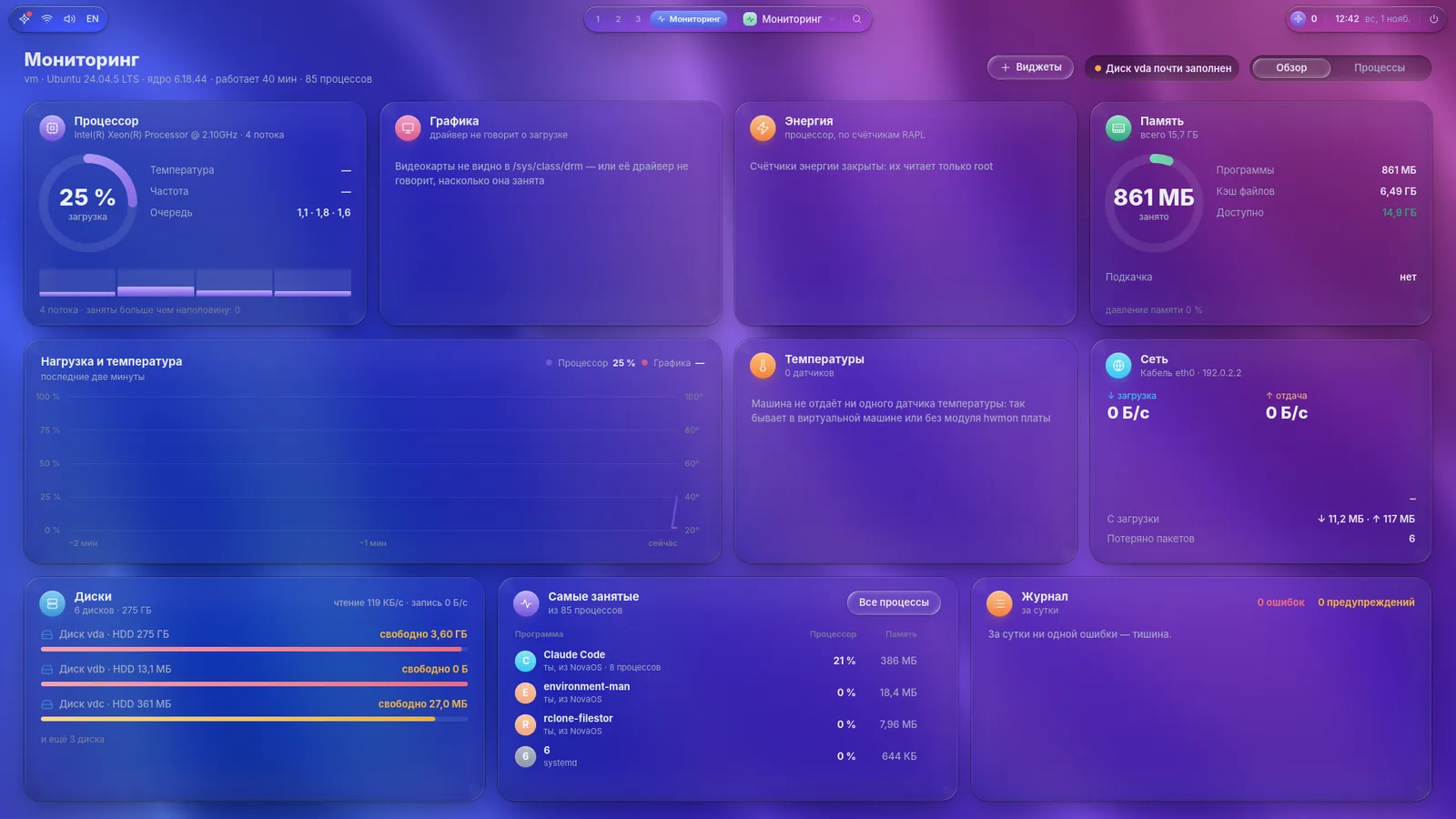
CPU, memory, disks, network and temperatures on one page. 20 desktop widgets and an Ask the Assistant button.
Screenshots
Screenshots with markup, and screen recording.
Disks
Partitions and formatting.
Settings
Accounts, Wi-Fi, Bluetooth, appearance and monitors, in the spirit of macOS.
Voice
Dictation into any field in Russian and English, answers read aloud, and Conversation with the Assistant with echo cancellation. Engines: Soniox and OpenAI.
Motion
Springs modelled on SwiftUI. An interrupted animation keeps its velocity. There is a Reduce motion mode.
Other apps
Chrome, Electron, Qt and GTK run as native Wayland clients, X11 through Xwayland. Wine works.
Games
Steam opens as a separate game mode on Super+G and is frozen while Navision is on screen.
install.sh · Beta 1
Install with one command
The first public beta. CI builds both downloads from changes that passed every check.
Navision for Ubuntu
The installer looks at the machine and sets up packages, services and sign-in. All that is left is to sign in and enter your accounts: on first sign-in Settings → Accounts opens.
curl -fsSL https://github.com/snemesh/navision/releases/download/latest-main/install.sh | sh
Running the same command again updates the system. To remove it: sudo novaos-setup remove from a text console.
Remote Navision
Open the dmg and drag Remote Navision to Applications. The build is not notarized: the first time, press Open Anyway in System Settings → Privacy & Security.
Download RemoteNavision.dmgThe server needs Navision, passwordless SSH key sign-in and UDP ports 60100–60199 open.
- Ubuntu 26.04, x86_64 only. There are no ready builds for other versions.
- An AMD, Intel or NVIDIA graphics card. Every measurement here was taken on AMD. The installer sets up the NVIDIA driver, but Navision has not been verified on NVIDIA yet: expect bugs.
- The interface is in Russian for now. Dictation understands Russian and English.
- Bring your own subscription. Agents run through the official Claude Code or Codex CLI on your account.